 All posts
Dell Computer Serial Number Lookup: Find and Verify It
Learn how to find your Dell service tag, run a warranty lookup, and properly document your computer's serial number for insurance claims and home inventories.
Corey Everett built Arclyst from a background in Library and Information Science, with the goal of bringing structured information management into everyday home life.
Gemini-assisted drafts are reviewed by Corey Everett before publication.
Publisher: EverCreate Studio
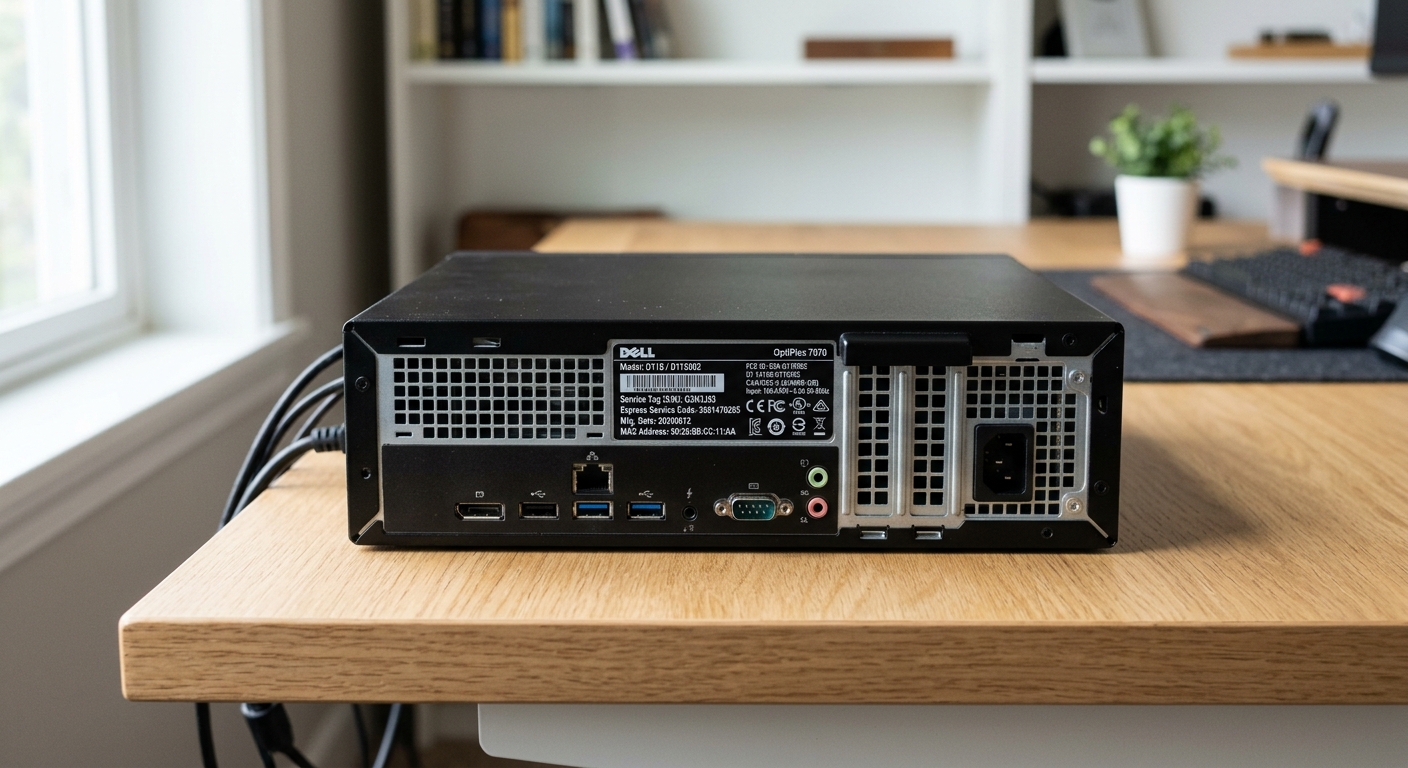
A Dell computer serial number lookup takes under a minute: run Get-CimInstance Win32_BIOS in Windows PowerShell, check the sticker on the bottom of your laptop, or read the service tag directly in the BIOS menu. But finding the number is only the first step. That 7-character code only matters if you save it alongside a photo and a receipt in a searchable home inventory, transforming a simple string of text into verifiable proof of ownership when you need to file an insurance claim.
Key takeaways
- Dell's 7-character service tag works as the serial number and can be found on a chassis sticker, in the BIOS, or via a quick Windows PowerShell command.
- Dell's warranty lookup returns vital claim data. Searching your service tag reveals your exact model, original ship date, and warranty end date, which together help establish the age of the device for an insurance claim.
- A serial number alone is not proof of ownership. It becomes highly effective evidence only when stored with a photo of the device, the original receipt, and the warranty date in a searchable home inventory.
- A service tag is low-risk if exposed. It functions somewhat like a license plate, but you should never post it publicly alongside your name, address, or phone number.
- The documentation habit applies universally. Recording the serial number and capturing a photo applies just as strongly to guitars, firearms, and other valuables with manufacturer lookup tools.
When a colleague's backpack was stolen from a coffee shop a few years ago, his immediate panic wasn't about the hardware itself—it was about the data and the replacement cost. When he filed the police report, the officer asked for the laptop's serial number. He didn't have it. When he filed his insurance claim, the adjuster asked for the exact model and proof of purchase. He didn't have those, either.
Electronics are high-theft, high-value items, and they are notoriously difficult to replace at full value if you cannot prove exactly what you owned. Documenting your Dell computer's serial number before a loss is one of the highest-leverage organization tasks you can do.
What is a Dell service tag, and where do I find it?
A Dell service tag is a 7-character alphanumeric code that identifies your specific machine. For all Dell lookup purposes, the service tag is the serial number. When you enter this short code on Dell's official support site, the system retrieves your exact model configuration, the date the unit shipped, and its current warranty status.
Dell documents the tag and its companion code—the Express Service Code—on its official support site. If you are recording this information to establish proof of ownership, you should write down both the service tag and the full model name, as insurers typically ask for the make and model alongside the serial number.
Laptop locations
For most modern Dell laptops (like the XPS, Latitude, or Inspiron lines), check the sticker on the bottom chassis of the machine. It is usually printed clearly next to a barcode. On much older models with removable batteries, you may need to pop the battery out and look inside the battery bay.
Desktop and all-in-one locations
If you have a desktop tower, look on the top, side, or rear panel of the case. For all-in-one machines where the computer is built into the monitor, the sticker is typically located on the lower back panel or directly under the stand.
Service tag vs. Express Service Code
You will often see an "Express Service Code" printed as a barcode right next to the service tag. This is simply the 7-character service tag converted into a longer string of digits. Dell uses this numeric version because it is easier for automated phone routing systems to understand when you call in for support. Either code identifies the exact same machine.
How to find your Dell serial number in Windows (without flipping the machine)
Laptops that travel in and out of backpacks every day often suffer from worn-off chassis stickers. Desktop towers are frequently shoved under heavy desks, tangled in a web of cables that makes checking the back panel a dusty, frustrating chore.
Fortunately, Windows can read the service tag directly from the motherboard's BIOS. You have three software-based options, and each takes less than a minute.
The PowerShell method
On modern Windows 10 and Windows 11 builds, PowerShell is the most reliable way to pull your system information.
- Press the Windows key, type PowerShell, and press Enter.
- In the blue window, type or paste the following command exactly:
Get-CimInstance Win32_BIOS - Press Enter.
- The output will display several columns. Look for the one labeled SerialNumber. The 7-character code listed there is your service tag.
Copy it exactly, including any letters, and save it with your purchase date and receipt.
The Command Prompt method
If you prefer the classic Command Prompt, you can use the Windows Management Instrumentation Command-line (WMIC).
- Press the Windows key, type cmd, and press Enter.
- Type the following command:
wmic bios get serialnumber - Press Enter. The service tag will appear on the next line.
Note: On some newer Windows 11 builds, Microsoft has begun deprecating the WMIC tool, so the PowerShell method is generally recommended for future-proofing your habits.
BIOS and SupportAssist
If your Windows operating system is corrupted and will not boot, you can still find the tag. Restart the computer and rapidly tap the F2 key to enter the BIOS setup screen. The service tag is prominently listed on the main system information page.
Alternatively, on a fully working machine, you can open the preinstalled Dell SupportAssist application from your start menu. The service tag is displayed right on the app's home screen.
Once you have the number, remember that it only counts as proof of ownership if it is stored somewhere you can access after a fire, flood, or theft. A home inventory app like Arclyst keeps serials, receipts, and warranties searchable room by room, ensuring the number you just found is claim-ready instead of sitting in a random text file on the very laptop that might get stolen.
Can I find my Dell serial number if the computer won't turn on?
Yes. The service tag is printed on the physical chassis, so you can read it with the machine powered off. But what if the computer is already sealed in a moving box, completely dead, or stolen? You still have offline and cloud-based sources to check.
Original packaging and receipts
If you kept the original cardboard box, look for the shipping label near the barcode. Dell prints the service tag alongside the model number on this exterior label.
More importantly, check your email. Your emailed receipt or invoice from Dell (or a major retailer like Best Buy) usually lists the serial number. This document is incredibly valuable because it doubles as proof of purchase for an insurance claim.
Your Dell account
If you registered the machine when you bought it, you can simply sign in at Dell's official support site. Your account dashboard will show all your tagged devices and their current warranty status without you ever needing to touch the physical computer.
Save whatever documentation you find into a searchable home inventory while you are logged in. The record must exist before you need it.
How to run a Dell warranty lookup by serial number
To verify your machine's details, go to Dell's official support site, locate the support or warranty search box, enter your 7-character service tag, and submit. The lookup pulls the manufacturing and support record tied to that specific tag, and you do not need an account to run this search.
Do this before a loss occurs, and take a screenshot of the result.
What the lookup returns
The results page is a goldmine for home inventory documentation. It shows your exact model configuration, the original ship date, and the current warranty status with its expiration date. That combination of data is far more useful than the 7-character string alone: it ties your specific machine to a model, an age, and a coverage window all on one screen.
Using the ship date as proof of age
In insurance claims, adjusters calculate depreciation based on the age of the item. The ship date provided by Dell's lookup closely approximates when the computer was purchased. This is often the hardest fact to prove in a claim once paper receipts are lost or faded.
Save the screenshot of this lookup alongside your serial number in a searchable catalog so both are retrievable together. Understanding the age of your electronics is critical when navigating the difference between actual cash value vs replacement cost in your policy.
Dell vs. Mac: How serial number lookups compare
If you have a mixed-device household, it helps to understand how different manufacturers handle hardware identification.
| Feature | Dell | Apple (Mac) |
|---|---|---|
| Number format | 7-character alphanumeric service tag | 10 to 12-character alphanumeric serial number |
| Where it lives | Bottom sticker, or command line in Windows | Engraved/printed on device chassis, or in "About This Mac" |
| Coverage check | Dell's official warranty lookup by service tag | checkcoverage.apple.com |
Dell relies on a short, easily typed tag and physical stickers. Apple engraves the serial number directly onto the aluminum chassis of most Macs and surfaces it prominently in the "About This Mac" menu, eliminating the issue of peeling stickers.
Either way, the number only helps an insurance claim if it is saved somewhere you can find it later. A photo of the device plus its serial number in one unified record is what turns a simple lookup into actionable proof of ownership.
Why should I record my Dell serial number in a home inventory?
A serial number is the strongest proof-of-ownership detail you can attach to an electronic device. Photos show that you owned a laptop; the service tag shows that you owned that specific laptop.
Furthermore, after a theft, the serial number goes directly into the police report. If law enforcement recovers stolen electronics or checks pawn shop registries, the serial number is the primary mechanism used to match recovered property back to you.
What an adjuster does with a serial number
An insurance adjuster uses the serial number to verify that the item exists, match it against your listed model, and confirm the age and specifications you are claiming.
A claim line reading "Dell XPS 15, service tag 8X9Y2Z1, purchased 2023, $1,900" is concrete, verifiable, and incredibly difficult to dispute. Conversely, a claim line that just says "laptop, $1,900" is vague and invites heavy scrutiny. Documented serial numbers move a claim from your word against a charred shelf to a verifiable, objective record. (You can read more about how missing serial numbers impact insurance payouts).
Pairing the tag with a photo and receipt
Capture the number once using PowerShell so you never have to flip the machine over again. Then, store it with a wide-shot photo of the device and a digital copy of the receipt in a searchable home inventory, organizing it room by room. When you eventually buy a replacement computer, make it a habit to add its serial number to your inventory on the very same day.
Is it safe to share my Dell service tag?
People often wonder if a service tag is sensitive information like a password or a Social Security number. The short answer is that exposing it carries low risk, but not zero risk.
Low-risk, but not zero-risk
A service tag is not a password. Anyone who has it can look up your model and warranty status on Dell's site, and they could theoretically use it to request support or initiate an ownership transfer conversation with Dell.
However, this is generally an annoyance rather than a severe security breach. A stranger with your service tag cannot log into your machine, read your personal files, or make purchases with your credit card. Treat it like a license plate on your car: it is useful to a stranger only in very narrow cases, and harmless in most.
The realistic risk comes from data pairing. If a scammer finds your service tag and your full name, address, and phone number in the same public forum post, they have enough information to sound highly convincing if they call you pretending to be Dell technical support.
How to store it safely
Save the service tag in your private home inventory record alongside the model, purchase date, and receipts. Do not post it publicly. If you are doing a video tour of your moving boxes, don't zoom in on the shipping labels. If you are asking for troubleshooting help on Reddit or a tech forum, do not share screenshots of your BIOS screen without blurring the service tag first.
Keeping it private and backed up covers both failure modes: losing the number before a disaster, and handing it to someone who shouldn't have it.
How to build a device record that survives a move or a claim
A device record that actually holds up in an insurance claim has four distinct parts: a photo, the serial number, the receipt, and the warranty end date. Capture all four while the machine is sitting right in front of you.
The 4-part record: photo, serial, receipt, warranty date
- Photograph the device: Take a wide shot showing the computer in your home, then take a close-up of the service tag sticker.
- Capture the serial: If the sticker is worn or the machine is mounted somewhere awkward, pull the serial from the command line instead and screenshot the output.
- Attach the receipt: Upload the PDF order confirmation email or a photo of the paper receipt.
- Note the warranty date: Run the Dell warranty lookup and save a screenshot of the expiration date.
Apple makes the same case for Macs: the serial number appears in the software and on the physical device, and you should document it thoroughly. Always verify the characters against the source.
Doing this for every device in one sitting
Tackling your inventory room by room is the only pace that actually gets the job done. Arclyst is built to start with photos: you shoot the device, the system builds a searchable catalog around the image, and you can manually attach the serial number and warranty date to that specific record.
A quick caveat on automation: While AI and Optical Character Recognition (OCR) are powerful, they can occasionally misread worn, tiny, or glare-covered stickers. Always manually check the tag characters captured against the physical machine before trusting the record. A laptop, monitor, and printer fully documented in one evening beats a "perfect" spreadsheet that you never get around to starting.
Do serial number lookups work for other valuables?
Yes. The habit of recording serial numbers extends far beyond electronics. Manufacturer lookups are incredibly useful for dating and verifying other high-value items.
- Firearms: Manufacturers like Sturm, Ruger & Co. and Winchester offer serial lookup tools that can date a firearm.
- Guitars: Fender's serial lookup tool helps identify the exact model year and manufacturing location of a guitar.
This matters immensely for proof of ownership. A dated record tied to a verified serial number is a far stronger piece of evidence in an insurance claim than vaguely listing "a Fender Stratocaster, roughly 2015."
Why currency serials are different
While dollar bill serial lookups exist online, they serve collectors hunting for "fancy" serial numbers or printing errors, not owners trying to prove possession. Cash has no central registry that you can point an insurance adjuster to. This is why a clear photo of the cash alongside a note of the denomination and serial number is the only practical way to record it—though you should always check your specific policy's limits on cash reimbursements.
The core habit remains the same regardless of the item: record the serial, photograph the item, and store both where you can easily retrieve them, room by room. (Learn more about how visual proof speeds insurance claims).
FAQ
Is the Dell service tag the same thing as the serial number? For practical purposes, yes. Dell's 7-character service tag is the unique identifier you enter on Dell's support site to pull up your exact model, ship date, and warranty status. The Express Service Code printed beside it is just the same tag converted to digits; either one identifies the same machine.
How do I find my Dell service tag if the sticker is gone and the laptop won't boot? Check the original cardboard box label near the barcode, your emailed receipt from Dell or a retailer, or your Dell account if you registered the machine. Signing in at Dell's support site shows your tagged devices and their warranty status without needing the physical sticker or a working computer.
Can I look up a stolen Dell laptop by serial number? Not directly for tracking purposes. Dell's lookup shows the model, ship date, and warranty status tied to a tag, but it is not a GPS tracking or recovery tool. The serial number's primary role after a theft is going into the police report, which is how recovered property gets matched back to you by law enforcement.
Does the Dell warranty lookup show the original purchase date? It shows the original ship date, which closely approximates when the computer was purchased. Because the exact age of an item is often the hardest fact to prove in an insurance claim once receipts are gone, you should screenshot the lookup result and save it with your serial number before a loss occurs.
Where should I keep serial numbers for insurance purposes? Store them in a searchable, cloud-backed home inventory alongside a photo of the device, the receipt, and the warranty end date. A number sitting in a text file on your desktop will not survive a fire or theft. Documenting your belongings room by room is the most effective way to ensure your records are ready when you need them.
Related guides
Want a frictionless way to catalog what you own? Try Arclyst — free for 55 items. Snap a photo, AI fills in the details.