 All posts
QR Codes vs. Barcodes for Home Inventory: What Each Identifies
Understand the technical differences between retail barcodes and custom QR codes for home inventory. Learn how to track assets and label storage containers.
Corey Everett built Arclyst from a background in Library and Information Science, with the goal of bringing structured information management into everyday home life.
Gemini-assisted drafts are reviewed by Corey Everett before publication.
Publisher: EverCreate Studio
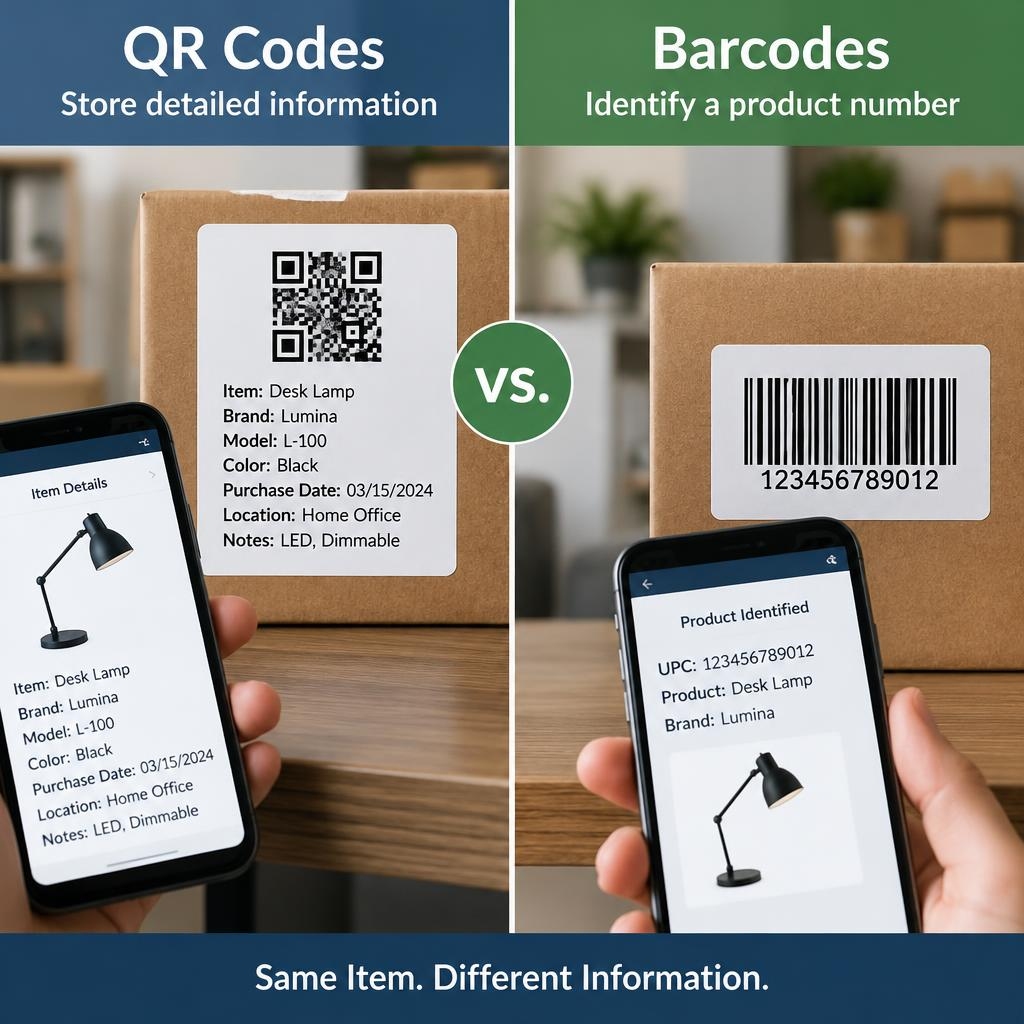
In a home inventory system, retail barcodes (like UPCs) identify a universal class of product, while custom QR codes are used to identify a specific, unique container or individual asset. Scanning a barcode on a retail box tells a system what the item is (e.g., a Sony digital camera), but scanning a custom QR code on a storage bin tells a relational database exactly where your specific items are located. Understanding the technical distinction between these symbologies is critical for building an organized, searchable catalog of your belongings.
Key Takeaways
- Retail barcodes (1D) lack uniqueness: A standard UPC identifies the manufacturer and product model, but it cannot differentiate your specific television from millions of identical models.
- Manufacturer serials provide unique IDs: Often printed as Code 128 barcodes, manufacturer serial numbers uniquely identify an individual unit for warranty and insurance purposes.
- QR codes (2D) excel at container tracking: Because they can store URLs or unique identifiers (UUIDs), QR codes are ideal for labeling storage bins and linking them to digital content lists.
- Error correction matters: QR codes utilize Reed-Solomon error correction, allowing them to remain scannable even if a moving box label is scuffed, torn, or partially obscured.
- Data mapping requires a relational structure: A QR code on a box does not store a list of items; it stores a unique ID that queries a database to display the items assigned to that container.
QR Codes vs. Barcodes: A Technical Comparison
Before designing a labeling system for your home or storage unit, it helps to understand the structural differences between linear barcodes and matrix barcodes.
| Feature | 1D Barcode (UPC/EAN) | 2D Barcode (QR Code) |
|---|---|---|
| Symbology Type | Linear (horizontal lines and spaces) | Matrix (two-dimensional grid of squares) |
| Data Capacity | Typically 12-13 numeric characters | Up to 4,296 alphanumeric characters |
| Primary Home Use | Identifying retail product models | Labeling unique storage bins and specific assets |
| Uniqueness | Universal (shared by all identical products) | Unique (generated specifically for your database) |
| Error Correction | None (damage prevents scanning) | High (can sustain up to 30% damage and still scan) |
| Scanning Requirement | Laser scanner or camera-based app | Camera-based app (smartphone) |
Understanding Retail Barcodes (UPCs and EANs)
When you buy a product, the packaging almost always features a 1D linear barcode. In North America, this is typically a UPC-A (Universal Product Code); in Europe and elsewhere, it is an EAN-13 (European Article Number).
What Retail Barcodes Actually Identify
Retail barcodes are designed for point-of-sale systems and supply chain logistics. A standard 12-digit UPC-A consists of two main parts: a Company Prefix assigned by GS1 (the global standards organization) and an Item Reference assigned by the manufacturer.
When you scan a UPC with a home inventory app, the app queries a global product database to retrieve the item's make, model, and general description. This is highly useful for rapidly populating the basic details of a new purchase into your catalog.
Limitations for Insurance and Asset Tracking
Because UPCs identify a class of product, they do not identify your specific asset. If you and your neighbor buy the exact same model of microwave, the UPCs are identical. Therefore, a UPC alone does not establish proof of ownership, nor does it help track the lifecycle, warranty status, or specific location of your item. Relying solely on retail barcodes leaves your inventory incomplete from a documentation standpoint.
Individual Asset Identifiers: Serial Numbers vs. Custom Tags
To track individual assets—especially high-value electronics, power tools, and appliances—you must move beyond the universal product code to unique identifiers.
Manufacturer Serial Barcodes (Code 39 and Code 128)
Most electronics feature a secondary sticker on the back or bottom containing the serial number. Unlike the UPC, the serial number is unique to that exact unit. Manufacturers often encode these serial numbers using Code 39 or Code 128 symbologies—1D barcodes that support alphanumeric characters.
Capturing this specific barcode is crucial for tracking serial numbers for warranty claims, recalls, and insurance documentation. While you can scan these with specialized apps, modern AI home inventory systems can often simply read the alphanumeric text directly from a photograph using Optical Character Recognition (OCR), eliminating the need for a dedicated barcode scanner.
Applying Custom QR Codes to High-Value Assets
Some homeowners and small business owners choose to generate and print their own custom QR codes (often called asset tags) to stick directly onto high-value items.
When scanned, this custom QR code typically contains a URL or a UUID (Universally Unique Identifier) that links directly to the item's specific record in a personal database. This allows you to instantly pull up the purchase date, manual, and warranty expiration just by pointing your phone at the back of your television. However, for most household items, simply photographing the manufacturer's serial number is sufficient and requires less administrative overhead than printing custom asset tags.
Container Labels: Organizing Bins and Boxes
The most powerful application of custom labeling in a home inventory is container management. When packing for a move or organizing storage bins, QR codes provide a significant technical advantage over handwritten lists or 1D barcodes.
Why QR Codes Dominate Container Tracking
QR (Quick Response) codes are two-dimensional matrix barcodes. Their architecture makes them uniquely suited for chaotic environments like attics, basements, and moving trucks:
- Omnidirectional Scanning: Unlike 1D barcodes, which must be scanned horizontally, QR codes feature three distinctive square "finder patterns" in the corners. A smartphone camera can instantly orient and read the code from any angle.
- Reed-Solomon Error Correction: QR codes use a mathematical error correction algorithm. If you generate a QR code with "High" (H) error correction, up to 30% of the code can be ripped, scuffed, or covered in packing tape, and your phone will still read it perfectly. 1D barcodes fail if a single vertical line is damaged.
- URL Embedding: A QR code can hold a complete web address. Scanning the box can open a specific webpage or app view showing exactly what is inside, without requiring the user to manually type a search query.
The Relational Database Structure
When you use QR codes for containers, you are essentially building a relational database. The QR code itself does not contain the list of your winter sweaters; it contains a unique ID for the container. The database handles the relationship between the container and the items inside.
Sample Item-to-Container Record
To understand how a QR code links physical boxes to digital records, consider the underlying data structure. When you scan a QR code on a plastic tote, the scanner reads a UUID (e.g., Bin-8472). The software then queries your inventory database for all items assigned to that parent ID.
Here is a simplified view of how that relational data is structured:
{
  "container_id": "Bin-8472",
  "qr_data_string": "https://inventory.example.com/container/Bin-8472",
  "container_name": "Holiday Decorations - Indoor",
  "location": "Attic - East Wall",
  "contents": [
    {
      "item_id": "Item-101",
      "description": "Glass Ornament Set (12 pcs)",
      "value_usd": 45.00
    },
    {
      "item_id": "Item-102",
      "description": "Pre-lit Artificial Garland (9 ft)",
      "value_usd": 60.00
    },
    {
      "item_id": "Item-103",
      "description": "Ceramic Village Display Pieces",
      "value_usd": 120.00
    }
  ]
}
In this model, if you remove the "Ceramic Village Display Pieces" from the bin, you simply update the database record. You do not need to print a new QR code for the bin, because the QR code's only job is to point to Bin-8472.
Common Misunderstandings About Scanning and Tracking
When setting up a home catalog, users often run into frustration due to misunderstandings about how barcode symbologies and data retrieval work.
Misunderstanding 1: "The QR code contains my entire inventory list."
While a QR code can hold up to 4,000 characters of text, modern inventory systems rarely use them this way. If you encoded a text list of contents directly into the QR code, you would have to print a brand new label every time you added or removed a single item from the box. Instead, the QR code stores a static link to a dynamic database record.
Misunderstanding 2: "Scanning the UPC proves I own the item."
Because UPCs are universal, having a scan of a UPC in your database only proves that a product exists in the world, not that you purchased it or currently possess it. Insurance documentation requires specific proof, such as a receipt, a photograph of the item in your home, or the unique manufacturer serial number.
Misunderstanding 3: "Any barcode scanner app will work for my inventory."
A generic barcode scanner app from an app store will simply output the raw text or numbers hidden in the code. If you scan a UPC, it will output "012345678912." Unless that scanner is connected to a product lookup database (like a dedicated inventory app), that 12-digit number is useless to you.
How to Choose the Right Labeling System for Your Home
Implementing an identification system doesn't mean you need to label every fork and book in your house. A strategic approach saves time while maximizing organization.
- For Retail Packaging: If you keep original boxes for electronics or collectibles, photograph the UPC and the serial number barcode. This captures the exact model and unique ID in one step.
- For High-Value Assets: Photograph the manufacturer's serial number plate. If the item lacks a serial number (like custom jewelry or antique furniture), rely on detailed photographs and appraisals rather than applying physical stickers.
- For Moving Boxes: Use printable QR code labels. Assign each box a unique number, stick the QR code on two opposing sides of the box, and log the contents in your database before taping it shut.
- For Long-Term Storage Bins: Use heavy-duty, waterproof QR code stickers. Because storage bins are accessed repeatedly over years, the high error correction of a QR code ensures the label remains readable even if it gets scratched in the garage.
Frequently Asked Questions
Can I generate my own QR codes for storage bins?
Yes. There are many free online QR code generators that allow you to convert text or URLs into a scannable matrix. However, if you use a dedicated home inventory app, the software will usually generate these codes for you automatically, ensuring they link correctly to your internal database.
What happens if a QR code on my moving box gets ripped?
Because QR codes use Reed-Solomon error correction, they can sustain significant damage (up to 30% depending on the generation settings) and still scan perfectly. If the code is completely destroyed, you can simply search your database for the box number or contents manually.
Do I need a special laser scanner for my home inventory?
No. Modern smartphone cameras, combined with the right software, are highly capable of reading both 1D linear barcodes (UPCs, Code 128) and 2D matrix barcodes (QR codes, Data Matrix). Laser scanners are generally only necessary for high-speed retail or warehouse environments.
Can I use the retail barcodes on my moving boxes instead of QR codes?
If you are reusing a retail box (like an old microwave box) for moving, scanning the printed UPC will only identify the microwave that used to be in the box. It will not help you track the books you packed inside it. You should cross out old retail barcodes to avoid confusion and apply your own unique QR code for the move.
How do I link a QR code to a simple spreadsheet?
If you are using a manual spreadsheet instead of a relational database, you can generate a QR code that contains a "Search URL" for your cloud spreadsheet (e.g., a link that opens your Google Sheet and searches for "Box 12"). However, this is often clunky on mobile devices compared to using dedicated inventory software.
Managing the technical details of asset identification can quickly become overwhelming if you rely entirely on manual data entry and physical labels. Arclyst helps simplify this process by allowing you to photograph your belongings, receipts, and serial numbers, using AI to extract the relevant text and organize it into a searchable digital catalog without requiring you to generate custom barcodes for every item. Consider starting with your most valuable assets or your most chaotic storage bins to see how a structured database improves your home organization.
Related guides
Want a frictionless way to catalog what you own? Try Arclyst — free for 55 items. Snap a photo, AI fills in the details.